Guang Dong-Hong Kong (GZ) Smart Printing Co., LTD.
News

NEWS

We will broadcast real time self-adhesive label industry information for you

How Can an RFID Label Stop Scan Failures and Inventory Drift?

2025-12-23 0 Leave me a message

Abstract

If your RFID Label project looks perfect on paper but falls apart on the warehouse floor, you’re not alone. Most failures aren’t caused by “bad RFID”—they’re caused by mismatched tag design, surface physics (metal, liquids, stacked items), inconsistent encoding workflows, or labels that can’t survive heat, abrasion, or chemicals. This guide breaks down the real reasons an RFID Label underperforms and gives you a practical selection and testing framework, plus a deployment checklist you can hand to operations and IT.

Table of Contents

  1. What pain points does an RFID Label solve?
  2. What is an RFID Label really made of?
  3. Which questions choose the right RFID Label fast?
  4. Which RFID type fits your use case?
  5. Which materials and adhesives survive real conditions?
  6. Why do read rates drop in production?
  7. How do you pilot and scale with fewer surprises?
  8. What quality checks prove performance?
  9. How do you justify ROI without guesswork?
  10. FAQ

Outline

  • Translate your operational pain into measurable tag requirements.
  • Pick frequency and form factor based on environment and read workflow.
  • Match facestock, inlay, and adhesive to temperature, surfaces, and handling.
  • Validate with a pilot that includes real packaging, stacking, and conveyor speed.
  • Lock in encoding + printing controls so data stays consistent at scale.

What pain points does an RFID Label solve?

RFID Label

A good RFID Label is less about “cool tech” and more about eliminating expensive friction: rescans, manual counts, shipping errors, shrink, and the endless “where is it?” Slack messages. Here are the pain points buyers usually mention (and what to measure instead of relying on vibes).

Common pain points and the metrics that matter

Pain point you feel What it costs you Metric to track
Missed scans at dock doors Rework, delays, chargebacks Read rate (%) at real speed
Inventory accuracy “drifts” weekly Stockouts + dead stock Cycle count accuracy, variance
Manual labor to find items Hidden labor + slow fulfillment Pick time per order line
Mis-shipments and returns Reverse logistics and brand damage Error rate per 1,000 orders
Asset loss or untracked tools Replacement + downtime Asset utilization, loss incidents

Practical rule: if you can’t define the metric you’re improving, it’s hard to pick the right label construction or reader setup.

A quick mindset shift

Don’t start with “Which tag is cheapest?” Start with “Which RFID Label keeps a 99%+ read rate in our packaging, on our products, at our line speed?”


What is an RFID Label really made of?

Think of an RFID Label as a tiny radio system embedded inside a printable label: a microchip stores an ID (and sometimes user memory), and an antenna captures and reflects energy to communicate with a reader. The “label” part—facestock, adhesive, liner, print coating—determines whether that radio survives your environment.

The parts that decide success or failure

  • Inlay (chip + antenna): Drives read range, orientation sensitivity, and performance near metal/liquid.
  • Facestock: Paper or film. Impacts durability, print clarity, and chemical resistance.
  • Adhesive: Must match surface energy (plastic vs cardboard vs textured materials) and temperature cycles.
  • Printing + encoding workflow: The best tag can still fail if data is encoded inconsistently or printed off-spec.

When a project struggles, the root cause is often not “RFID doesn’t work”—it’s that one of these layers was chosen without accounting for how products are stacked, wrapped, refrigerated, or handled.


Which questions choose the right RFID Label fast?

If you want a reliable RFID Label without months of trial-and-error, answer these questions in order. You can use this as a briefing template for suppliers and internal stakeholders.

A 7-question selection checklist

  1. What are you tagging? Apparel, cartons, pallets, files, assets, or returnable containers?
  2. What surface does it stick to? Cardboard, PP/PE plastic, glass, metal, fabric, curved surfaces?
  3. What’s around it? Liquid products, foil packaging, dense stacks, metal shelving, or ESD-sensitive environments?
  4. How is it read? Handheld, tunnel, dock door, conveyor, or overhead portal—at what speed and distance?
  5. What data model do you need? Unique ID only, serialized SKU, batch/lot, or encrypted/authenticated data?
  6. How will you print and encode? Thermal transfer vs direct printing, on-demand vs pre-encoded, verification steps.
  7. What must it survive? Heat, cold chain, abrasion, UV, chemicals, laundering, or long-term archival storage.
Don’t skip this

If you only specify “UHF label, 100×30mm” you’ll get a product—but not necessarily a RFID Label that holds up under shrink wrap, stacking pressure, or freezer condensation.


Which RFID type fits your use case?

Most buyers compare tags by size and price, but performance depends heavily on frequency choice and read method. Use this table as a starting point, then validate with a pilot test.

UHF vs HF vs NFC at a glance

Type Typical read range Best for Watch-outs
UHF Longer range, bulk reads Logistics, inventory, retail item-level, asset tracking More sensitive to metals/liquids; orientation and placement matter
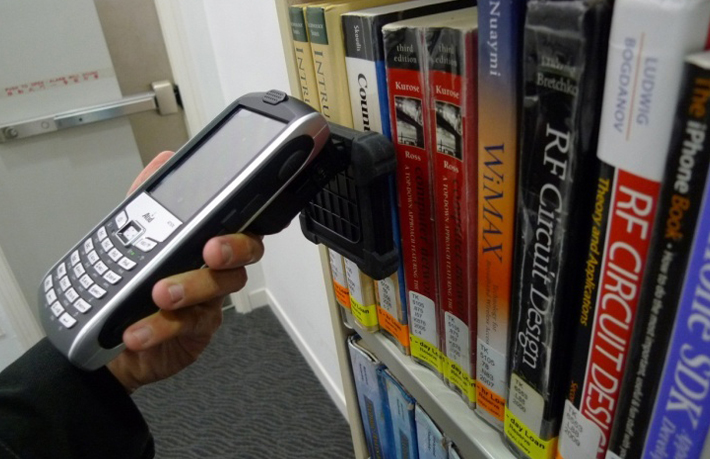
HF Short range Libraries, access control, item tracking in controlled environments Usually not ideal for fast portal reads at distance
NFC Phone-tap distance Consumer engagement, authentication, smart packaging Not designed for high-speed bulk inventory counting

If your goal is fast, hands-free counting, a UHF-focused RFID Label is often the practical default—then you tune inlay design and materials to your environment.

A simple rule: choose the read behavior you need first (bulk, hands-free, distance), then choose the tag construction that keeps performance stable on your actual product.


Which materials and adhesives survive real conditions?

The fastest way to “accidentally sabotage” an RFID Label is to treat it like a regular barcode label. Materials decide whether the label stays attached, stays readable, and stays scannable after handling.

Material choices that match common environments

Environment Recommended facestock Adhesive considerations Notes
Standard cartons & shelves Coated paper or PP film General-purpose permanent Optimize for print clarity + cost
Cold chain & condensation Film (PP/PE) with moisture resistance Freezer-grade adhesive Test adhesion after temperature cycling
Chemicals / wipe-down Durable film with protective topcoat Chemical-resistant adhesive Validate print + chip integrity after exposure
High abrasion handling Tough film + overlamination Permanent with strong shear Reduce edge lift and label tearing
Document/file tracking Smooth paper (archival-appropriate) Low-bleed adhesive Avoid adhesive seepage that damages papers

Printing and encoding choices that keep data consistent

  • Thermal transfer printing: Great for durable barcodes and human-readable text (especially with resin ribbons on films).
  • Direct printing (where applicable): Faster, but evaluate heat, fade resistance, and storage conditions.
  • Encode + verify: Add verification to catch weak inlays or encoding errors before labels hit the line.

Bottom line: the “right” RFID Label is a system decision—radio performance + print durability + adhesive behavior.


Why do read rates drop in production?

Read rate problems usually appear after scale-up, when the environment becomes “messy”: mixed SKUs, tighter stacking, faster conveyors, more metal nearby, different operators, and rushed label application. Here are the most common failure modes and how to prevent them.

A troubleshooting checklist for RFID Label performance

  • Metal or liquid interference: Move placement away from edges, liquids, or metal surfaces; consider specialized inlay designs for challenging substrates.
  • Orientation sensitivity: Validate performance at multiple rotations; design antenna direction to match your read field.
  • Stacking pressure and packaging: Test inside shrink wrap, corrugate, polybags, and stacked pallets—not just a single sample in open air.
  • Printer-encoder mismatch: Confirm your printer model supports the inlay pitch and encoding requirements.
  • Inconsistent data formatting: Lock down EPC/ID rules, serialization, and QA checkpoints so duplicate IDs don’t slip through.
  • Label application variance: Standardize placement guides; small shifts can change read behavior at portals.
A practical pilot test tip

Your pilot should be “mean,” not polite: simulate the worst normal day—fast line speed, dense stacks, mixed products, and realistic reader positioning. A pilot that only tests a single label on a desk won’t protect you later.


How do you pilot and scale with fewer surprises?

A smooth rollout usually follows a repeatable process: define requirements, test in context, iterate quickly, then lock the spec. If you want fewer “mystery failures,” build your implementation plan around controlled iteration and measurable acceptance criteria.

A deployment playbook you can copy

  1. Define success: Target read rate, encoding yield, print quality, and adhesion after handling.
  2. Request samples aligned to your environment: Provide surface details, packaging, temperatures, and read distance.
  3. Run a structured pilot: Include 3–5 placement options, multiple orientations, and real process speeds.
  4. Iterate the antenna/inlay selection: Adjust based on where performance drops (metal, stack density, portal geometry).
  5. Lock the specification: Size, pitch, chip type (if required), materials, adhesive, print method, verification steps.
  6. Scale with QA gates: Incoming checks, in-process verification, and final roll inspection.

Many buyers prefer suppliers who can turn samples quickly and validate designs in controlled testing, because it shortens the time between “idea” and “stable in production.” A supplier’s ability to support iterative design and roll-to-roll programming/inspection often makes scale-up dramatically smoother.


What quality checks prove performance?

EEAT isn’t just about sounding credible—it’s about showing your work. For an RFID Label, the best proof is repeatable testing with documented results.

Suggested acceptance checks for RFID Labels

Check What it prevents How to run it
Encoding verification Wrong IDs, duplicates, dead tags Encode + read-back verification (spot checks or 100% based on risk)
Read performance sampling Unexpected portal misses Test at defined distance/orientation in your packaging
Adhesion + shear Edge lift, label drop-off Apply to target surface, temperature cycle, then inspect
Print durability Unscannable barcodes/human text Rub test + exposure to expected handling conditions
Dimensional consistency Printer jams, mis-encoding Measure pitch, die-cut alignment, roll winding

Choose 100% inspection vs sampling based on your risk tolerance (high-value items, regulated workflows, or high chargeback exposure).


How do you justify ROI without guesswork?

The ROI story is usually straightforward when you tie it to one or two measurable pain points. A well-chosen RFID Label can reduce labor in counting and searching, shrink mis-shipments, and increase inventory accuracy—especially when you can read multiple items quickly instead of scanning one by one.

A simple ROI worksheet (fill in your numbers)

  • Labor saved: (minutes saved per cycle count) × (number of counts per month) × (labor rate).
  • Shipping errors reduced: (errors avoided) × (average cost per error: re-ship + handling + goodwill).
  • Stockouts reduced: (stockouts avoided) × (margin impact + expediting cost).
  • Asset utilization: (downtime avoided) × (hourly cost of downtime).

If you only need one win: start with dock-door accuracy or cycle-count efficiency—those are usually easiest to measure.


What should you expect from an RFID Label supplier?

RFID Label

For most teams, the “best supplier” is the one that helps you get stable performance quickly: the right inlay options, consistent roll quality, and a process that supports encoding, replacement, printing, and inspection. If you’re sourcing from China, ask how they handle iteration, testing, and roll-to-roll QA before mass production.

A buyer-friendly supplier checklist

  • Can they recommend antenna/inlay options based on your region and read workflow?
  • Do they support print + encode workflows (including verification) for your printer-encoder?
  • Do they have a structured pilot approach and measurable acceptance criteria?
  • Can they customize size, materials, and programming to match your application?
  • Do they provide consistent roll quality with documented QC checks?

At Guang Dong-Hong Kong (GZ) Smart Printing Co., LTD., teams typically start with a short requirements brief and pilot plan, then narrow down to the label construction that performs best in real packaging and real workflows—so scale-up is controlled, not chaotic.


FAQ

What’s the most common reason an RFID Label fails?

Mismatch between tag design and environment—especially metals, liquids, dense stacking, or inconsistent placement. A pilot test in real packaging usually reveals the true failure mode quickly.


Do I need UHF, HF, or NFC?

If you need hands-free bulk reading (inventory and logistics), UHF is often the practical choice. If you need short-range controlled reads, HF can fit. If you want phone interaction or consumer engagement, NFC is usually best.


Can I print and encode an RFID Label on-site?

Yes—many operations use printer-encoders to print variable info and encode IDs at the same time. The key is matching label pitch and inlay type to your specific printer model and verifying encoding.


How many tags should I test before mass production?

Test enough to reflect variance: multiple roll positions, multiple operators, multiple orientations, and real line speed. A “small but mean” pilot beats a large but unrealistic desk test.


Will RFID work near metal or liquid products?

It can, but you must select an appropriate inlay/antenna design and placement strategy, and validate it in real packaging. Don’t assume a standard label will behave the same on a metal surface or next to liquids.


What should I include in an RFQ for RFID Labels?

Include use case, surface, packaging, temperatures, read method/distance, printer-encoder model, data/serialization needs, and your success metrics (read rate, adhesion, durability).


Conclusion

A dependable RFID Label isn’t luck—it’s the result of matching the inlay, materials, adhesive, and encoding workflow to your real environment, then proving it with a disciplined pilot. If you want help narrowing down the right construction for your application (logistics, inventory, retail, apparel, file tracking, or anti-counterfeiting), contact us with your surface, packaging, read distance, and printer details, and we’ll help you move from “trial-and-error” to “stable at scale.”

Related News
Leave me a message
X
We use cookies to offer you a better browsing experience, analyze site traffic and personalize content. By using this site, you agree to our use of cookies. Privacy Policy
Reject Accept